Salvatore Amoroso.

Selected work

Architecture.
In practice.

The problems, the engineering, and the results.

01 / Product architecture · 2022–2026

One product, 150+ SAP customer integrations

  • 150+ SAP customer integrations on one product
  • 20.9% → <0.1% documents needing provider intervention, including L1 support
  • 60% shorter time from project start to go-live

I designed and delivered a multi-tenant SAP integration product for expense and invoice automation across ECC and S/4HANA, and led two SAP teams.

Delivery scope and result contextArchitecture, my contribution, and what the figures compare.

Queued, idempotent posting prevents duplicates. Master data is validated before sending, and failed documents can be corrected and reprocessed.

The intervention rate compares documents processed with the old architecture against the new architecture. Intervention means any provider-side help, including L1 support; it is not a document failure rate or a measure of customer-side effort.

Time-to-value compares project start to go-live under the old and new delivery approach. Developer tooling and deployment automation shortened that period by 60%.

Role
Solution architect and principal integration engineer
Span
2022 to 2026
Targets
SAP ECC 6.0, S/4HANA, private cloud, public cloud
Middleware
SAP Integration Suite — Cloud Integration (CPI), PI/PO, third-party platforms
Modules
FI-CO, MM, HR, and HCM

Product-wide results delivered with these teams. My contribution: architecture, principal engineering, SAP team leadership, and enterprise evaluations. Customer names are confidential.
02 / Architecture and implementation

Faster, more reliable SAP-to-SaaS synchronization

A redesign of the synchronization layer between a SaaS product and its customers’ SAP systems.

Problem
Slow loads, failures without retries, missed future-dated updates, and unchanged data sent repeatedly to the SaaS API.
My work
Rebuilt data access around SAP interfaces and ordered parallel queues, with retries, version handling for current and future periods, caching, and PUT change detection.
Result
Faster loads, recovery after temporary failures, and less service and middleware traffic. SAP interfaces replaced direct database reads.
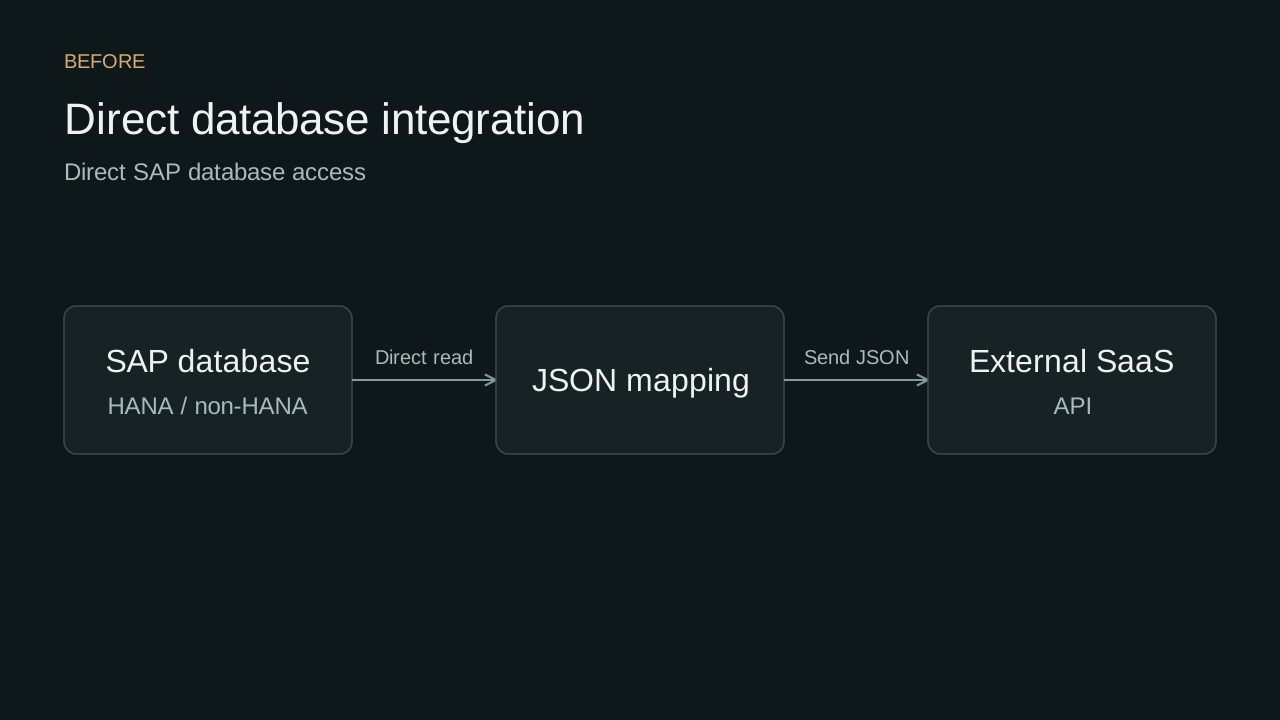
  1. Read SAP databaseDirect access to HANA or non-HANA data.
  2. Map to JSONNo retry or version handling.
  3. Send to SaaS APIEvery update triggers a call.
Before: a direct SAP HANA or non-HANA database read feeds JSON mapping, then sends data to an external SaaS API.
Before. Direct database reads, JSON mapping, and API delivery. Open full-size before diagram.

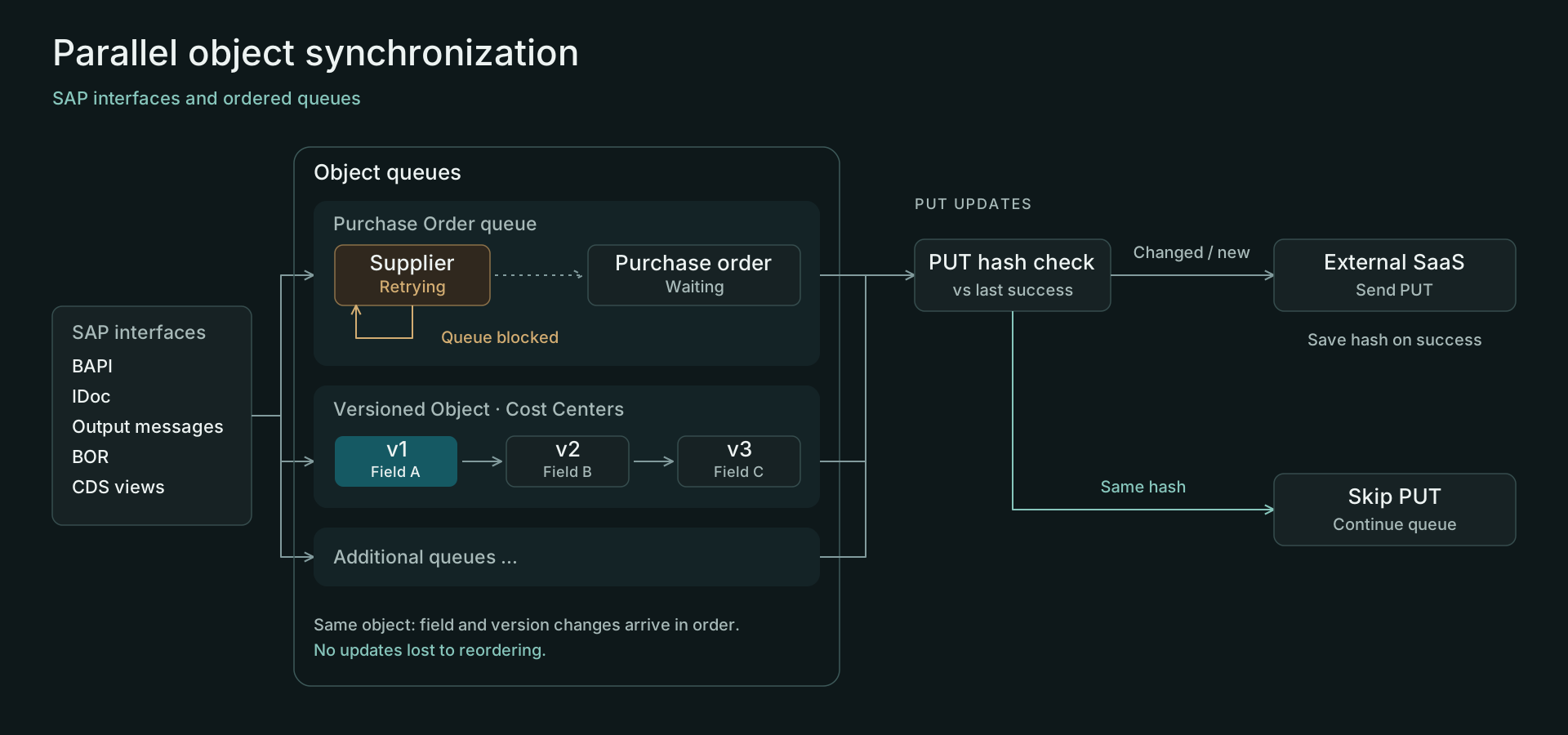
After · SAP interfaces and ordered queues

  1. Read through SAP interfacesBAPI, IDoc, output messages, BOR, and CDS views.
  2. Process ordered queuesRetry a failed unit in place. Hold its dependent work while independent queues continue.
  3. Check PUT payload changesCompare with the last successful update. Send changed or new content; skip identical content.
  4. Save on successSave the new hash after a successful PUT. On failure, retain the baseline and retry.
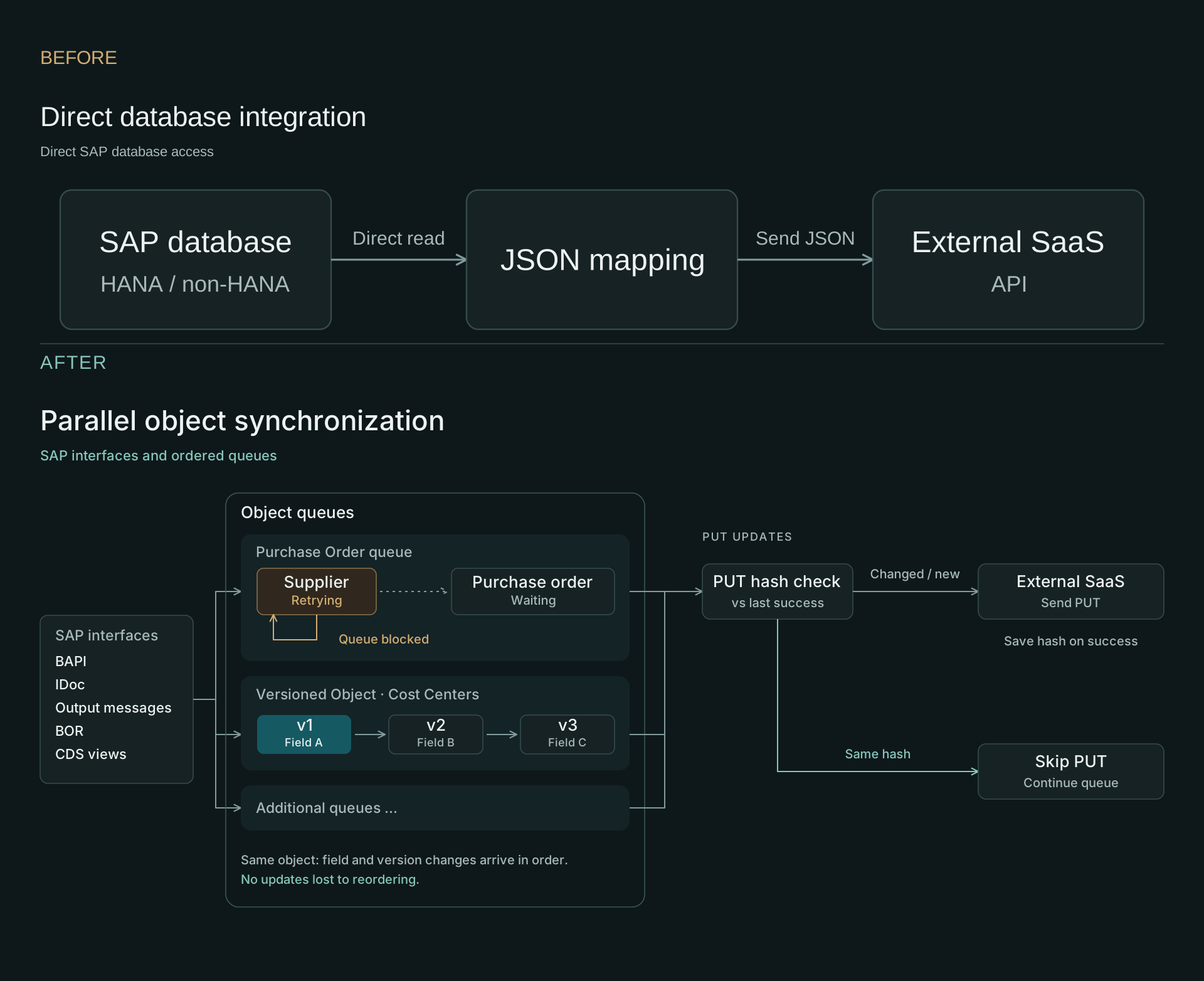
SAP interfaces feed ordered object queues. A supplier retry holds its purchase order while other queues continue. Cost-center versions arrive in order. Per-object PUT hash checks send changed content and skip unchanged updates.
After. SAP interfaces, ordered dependencies, parallel execution, and PUT change detection. Open full-size after diagram.

Download the before-and-after comparison (SVG)

How synchronization worksDependencies, retry behavior, and PUT change detection.

Initial and delta loads, especially for materials and invoices, were slow. Temporary errors failed entire units, future-dated versions were missed, and unchanged updates increased service load and middleware costs.

  1. BAPI, IDoc, output messages, BOR, and CDS views feed the object queues.
  2. A queue can contain multiple object types. In this example, the supplier resolves before the purchase order in the same queue.
  3. A failed unit retries in place and blocks later units in that queue. Independent queues can continue.
  4. Successive field or version changes to one object remain ordered, as shown by the cost-center example.
  5. Before a PUT, compare the object's payload hash with its last successful outbound update. Identical content skips the request and completes the unit. Changed content or a missing baseline sends the PUT.
  6. A successful PUT saves the new hash. Failure retains the previous baseline so the update remains eligible for retry. Other HTTP methods bypass this PUT-specific check.

The diagram illustrates processing behavior. Queue allocation, retry timing, and the hash algorithm depend on the implementation.

The Clean Core change shown here is replacing direct database reads with SAP interfaces. API choices and release status depend on the target SAP system.

In a separate SAP integration project, parallel processing, queues, caching, and hashing delivered at least 5× the throughput of the previous monolithic implementation. That comparison depends on customer system capacity and allocated resources.

Discuss your SAP integration →

03 / Agentic expense workflow

Clear visibility into expense agent actions

Supporting agentic AI transformation with SAP workflow configuration, execution tracking, and posting visibility.

Problem
The agentic SaaS worked as intended, but the customer had no clear view of the agent’s actions or their status in SAP.
My work
Built workflow configuration, execution logs, expense details, and queue and FI/HCM status views, with direct links to the related SAP records.
Result
Customers can see which actions are complete, which are still processing, and which need attention.
Full Expense Agent Monitor application with Configure Agent Workflow, Display Agent Execution Log, Display Parallel Queues, integration settings, expense details, document links, and FI/HCM posting statuses.
Completed actions and exceptions, with separate FI/HCM posting states. Open the full application for workflow settings, queues, and SAP record links.
Workflow configuration and execution trackingAgent settings, execution logs, queues, and SAP processing outcomes.
  1. Configure the agent workflow and its integration settings.
  2. Inspect execution logs and parallel queues to follow processing.
  3. Review expense details, separate FI/HCM posting states, and business messages.
  4. Follow the related accounting, HCM, or IDoc record to investigate the workflow's interactions with SAP.

Discuss your SAP-connected AI workflow →

04 / Commercial application

A simpler, responsive supplier workspace

A supplier self-service app sold to multiple Italian customers in aviation, pharmaceuticals, and retail.

The screenshots show this app using sample data. Customer identities are confidential.

Problem
SAP transactions were too difficult for most end users. Customers needed a simpler, responsive interface for everyday tasks.
My work
Designed and built the SAPUI5 interface for confirming purchase orders, submitting delivery notices, and invoicing.
Result
End users can handle routine supplier tasks in a simpler interface on desktop or mobile.
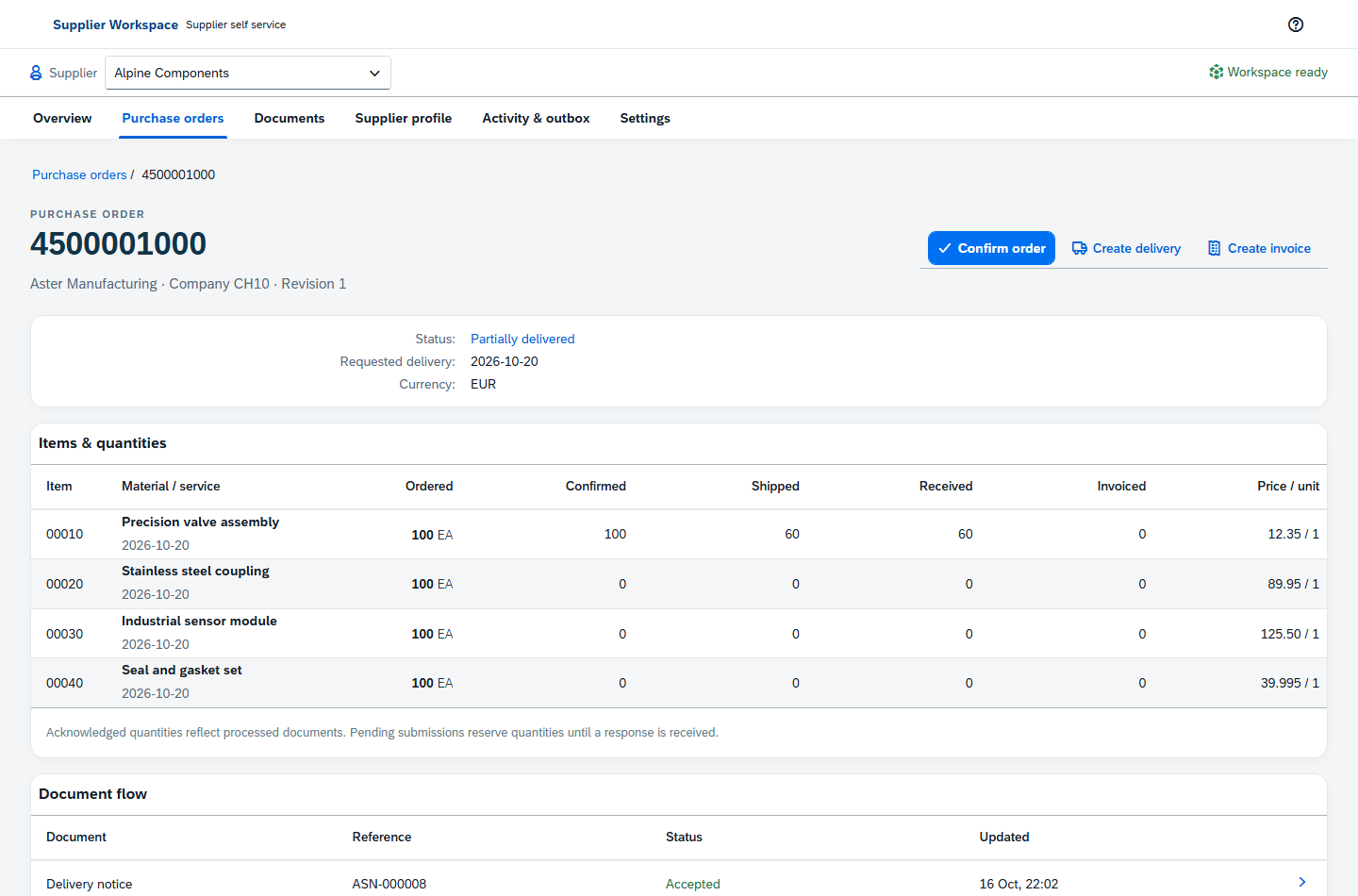
Supplier app showing a purchase order with sample data: 100 confirmed units, 60 shipped and received units, and an accepted delivery notice in the document flow.
Purchase-order quantities and related documents in the app, shown with sample data. Open full-size purchase order.
Supplier workflowOrder confirmations, delivery notices, invoices, and processing feedback.
  1. Review and confirm an order, then submit a partial delivery notice.
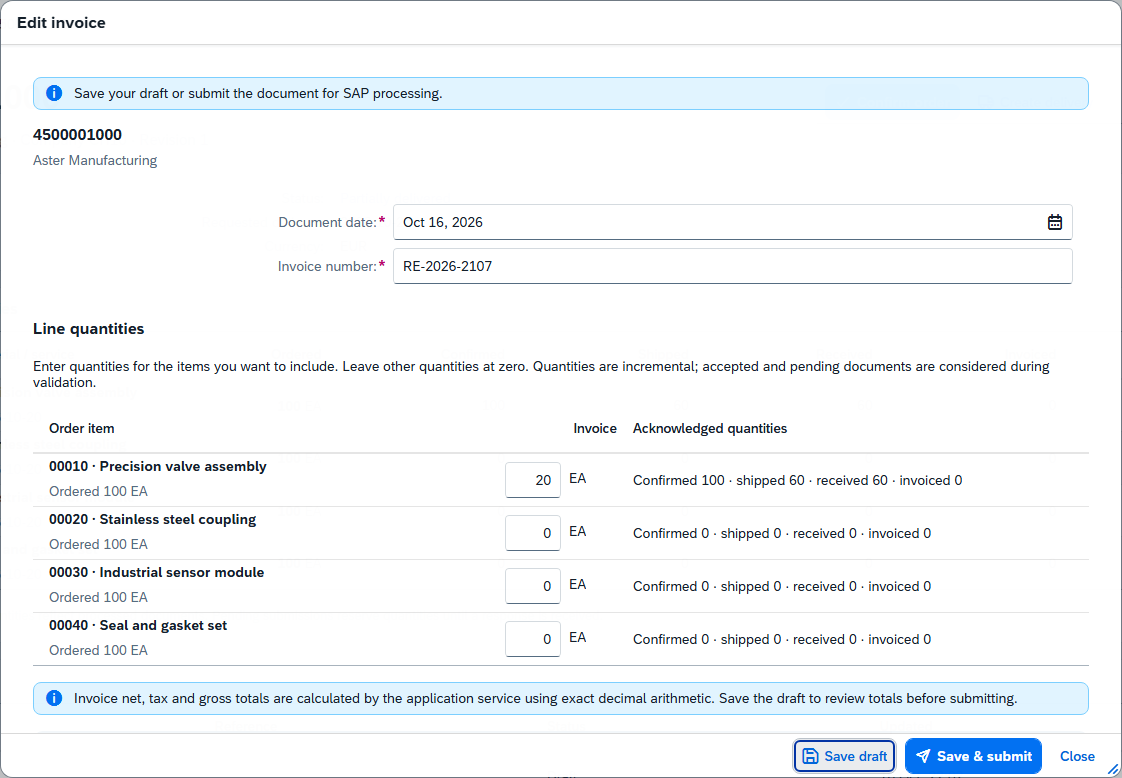
  2. Prepare an invoice against quantities recorded as received by the buyer.
  3. Follow document acknowledgements and processing exceptions.
Supplier app invoice dialog with sample data showing line quantities, acknowledged quantities, Save draft, and Save and submit actions.
The invoice dialog keeps acknowledged quantities beside the quantities being submitted.
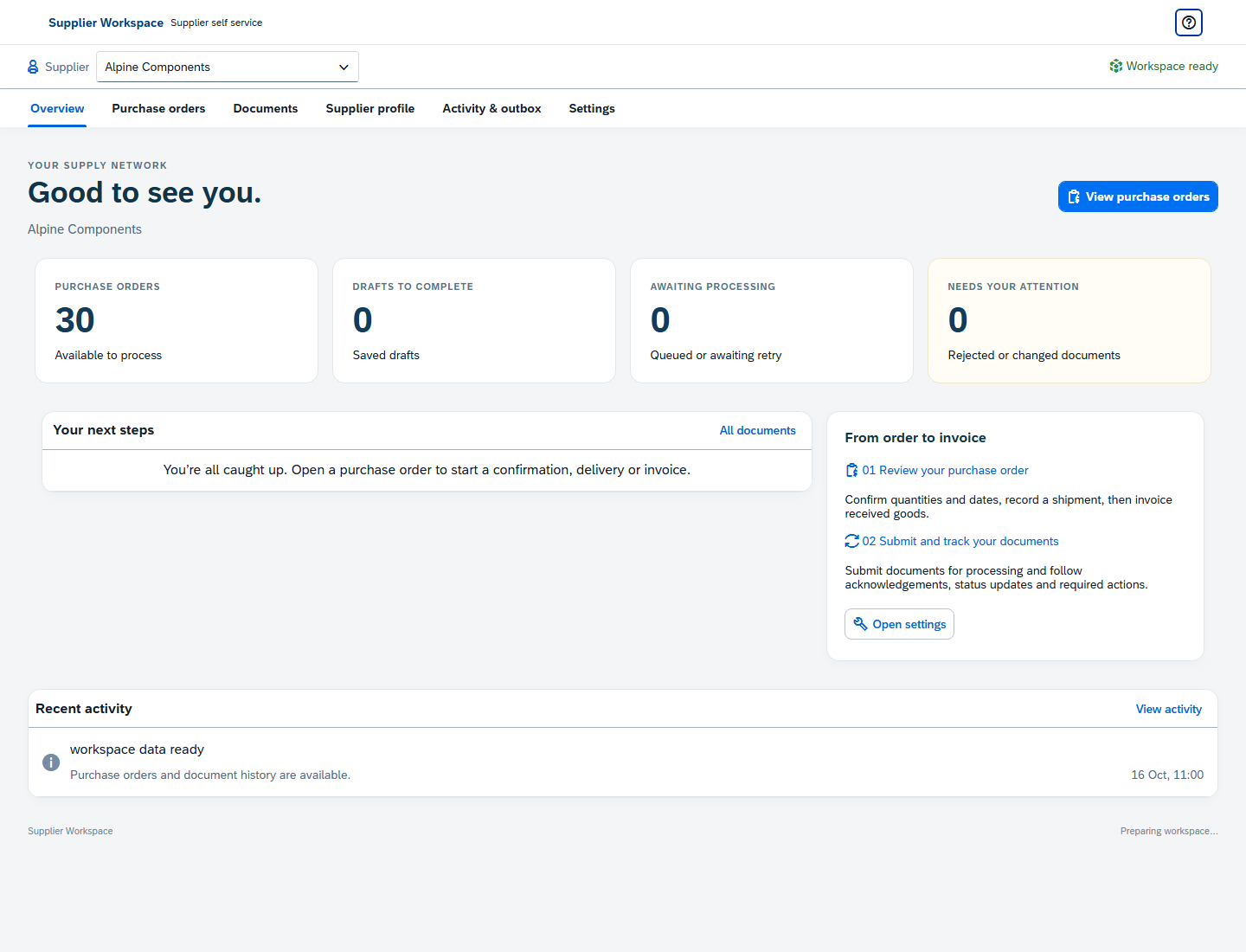
Supplier app overview with sample data showing purchase orders, drafts, pending submissions, exceptions, and recent activity.
The overview groups orders, drafts, pending submissions, and exceptions.

Fun project

Planeproof

A side project that helps you choose where to watch a film: cinema, home, or a plane.

Try Planeproof ↗

Planeproof homepage showing film search, cinema, home, and plane viewing categories, and trending films.

Have something to connect?

Let’s make
it work.

Discuss your project

With your engineers or a team I bring.
Architecture roles? Send the brief ↗